
Run an online event with a join link
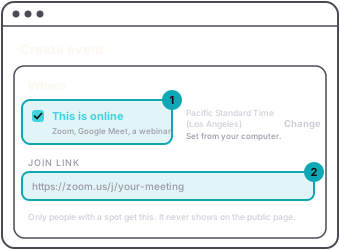
For a Zoom call, a Google Meet or a webinar, tick This is online under Where when you create the event. The venue and address fields go away.
The time zone is set from your computer and shown beside the box. Press Change to pick another. Online guests can be anywhere, so the ticket email gives the start time with the zone.
The join link goes in Join link. It has to start with https://, or you can leave it empty. Only people with a spot get it: it arrives in their ticket email as a Join the call button, with the link written out underneath. It never shows on the public event page.
Web
There is no location to hide on an online event, so the hide location switch is not offered when you create one.
AppNot in the app. Create it on the web.WebYour Events › Create an event › Where › This is online › Join linkGuestThe join link arrives in the ticket email, as a Join the call button. It never shows on the public page.